 Join The Club





The best Hall effect keyboards offer the speediest switches money can buy. They turn your real-world actions into lightning fast reactions in-game, but there's more to them than just that. Faster response times are only one feature on what are highly customisable, often analog, switches, and deliver special abilities to gamers not possible on mechanical gaming keyboards.
Razer, SteelSeries, Corsair and more all have options available using Hall effect switches—or in some cases, optical or induction (read more on the differences here). But the best? That accolade goes to the Wooting 80HE. It's fast, sure, but it stands head and shoulders above the rest for its ease of use and excellent application, the wonderfully-named Wootility.
The quick list

The best overall
The best way into Hall effect keyboards is the Wooting 80HE. The company behind it popularised the technology and that shows in how extensive yet easy to use its software is. The 80HE itself is slick and speedy, with an LED bar to boot.

The best budget
If you want to save some pennies, the Gamakay X NaughShark NS68 is your best bet. It has all the features and flexibility of a Hall effect keyboard in a cheaper chassis, allowing for a significant price reduction compared to some.

The best wireless
Keychron is an emerging name in gaming keyboards, having launched a heap of affordable units with high-end features. The K2 HE is prime example, offering wireless Hall effect for a fraction of the price of the competition.

The best low profile
The NuPhy Air60 HE is something a bit special, combining both low profile and Hall effect switches into one well-priced gaming keyboard. It's definitely worth a look.

The best looking
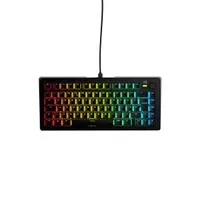
NZXT has put together a very impressive keyboard in the Function Elite. It feels great, has the perks of Hall effect, and it looks superb. Well, if you're into RGB lighting, anyways.

The best with a numpad
The Keychron Q5 HE has something rarely seen in Hall effect keyboards: a numpad. If you're hoping to dual-wield your keyboard for gaming and work/school, this is a great pick.
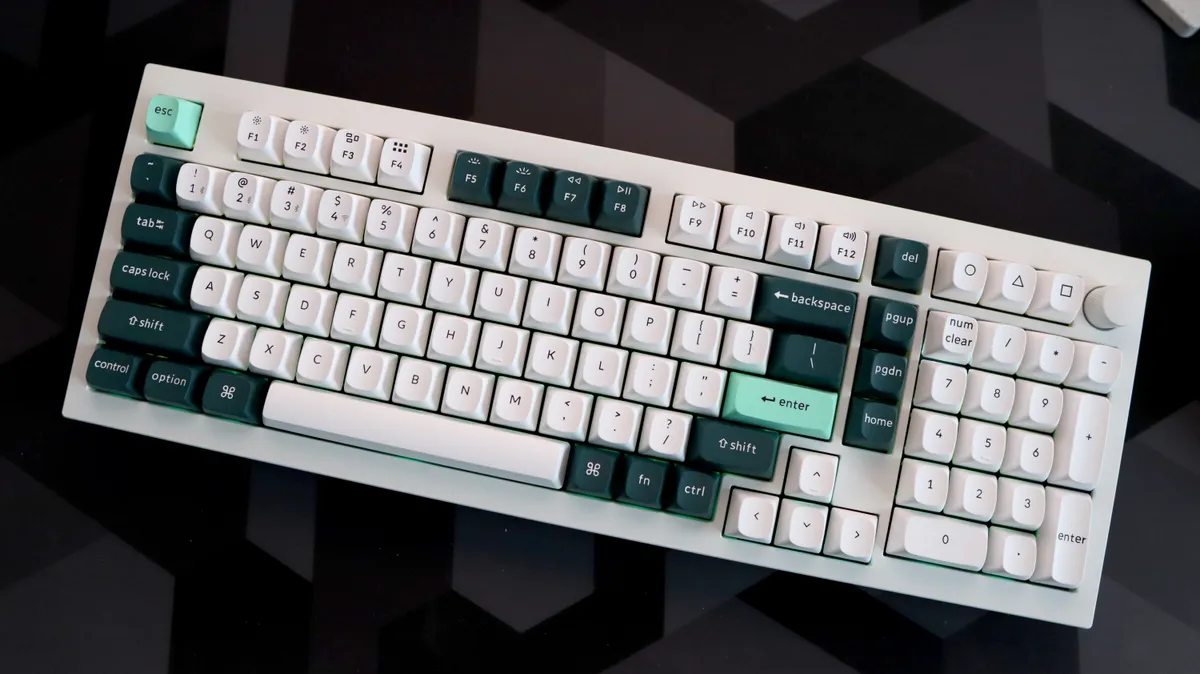


✅ You want one keyboard for every occasion: This is understandable, right? Not everyone is buying a keyboard just for gaming, that's a real luxury, and if you want the best of both, the Keychron Q5 HE offers it.
❌ You don't want to spend top dollar: The Q5 HE demands a kingly sum for its varied ability. It's not the most expensive keyboard around, but it's not cheap, either.
The best Hall effect keyboard with a numpad is the Keychron Q5 HE. This isn't quite a full-size board, but it's probably our preferred layout at 96%. That means it has all the keys you could ask for but squished into a tidy form factor.
If you plan to use the same keyboard for both work and gaming (most of us, I imagine), you might want to consider a larger unit with the full complement of keys. But you don't have to lose out on the more important Hall effect features for gaming to do so: the Q5 HE offers the full range.
It uses the same switches as the K2 HE, Gateron's Double Rail, which means it supports adjustable actuation down to a 0.2 mm sensitivity, which only requires the lightest press to register a key press. Similarly, it supports rapid trigger and multiple actions for a single key press (this takes some getting used to). All can be customised to your liking in the Keychron Launcher web application.
What's more, like the K2 HE, it's wireless with both 2.4 GHz and Bluetooth connectivity. The battery is rated to 100 hours, though you'll need to disable the lighting to get the most juice out of it. That's not such a big deal, as rather than shine through keycaps, the Q5 HE only offers rear lighting purely for looks alone. You won't see your keys as well in the dark, which is a bit of a miss, but the board looks great with the colorways on offer.
The case is made of CNC aluminum here, which not only looks great, means it doesn't slide around oin your desk or suffer any flex. It also feels like a premium product that's worth the money you've spent on it, which is a considerable amount, truth be told.
The many layers beneath the keys and the thick case help create a very satisfying clunk to every key press—a solid thock, some might say.
A great mix of work and play, the Keychron Q5 HE offers a bit of everything for a modern gamer with other things to do. It does cost more for that wider functionality, but it's very much a one and done purchase.
Read our full Keychron Q5 HE review.
Also tested
FAQ
What are the benefits of using a Hall effect, or analog, gaming keyboard?
Mechanical switches have long been the de facto choice for gaming keyboards, owing to their reliability, snappy response, and tactile feel. These switches are either on or off.
In recent years, however, we've seen the emergence of other switch technologies, such as Hall effect, but also optical and induction keys, that offer much wider functionality. These allow for a key to register whether a key is on, off, or somewhere inbetween. Think of it like the difference between the A, B, X, Y buttons on a controller and the triggers—the face buttons are binary, akin to mechanical switches, the triggers are analog, much like Hall effect (and they're often using Hall effect or Tunnel Magnetoresistance sensors these days).
Initially, gaming keyboards using these new kind of switches aimed to use them to imitate analog movement, ie allowing a switch to be used like something akin to a controller's triggers or analog sticks. While this is possible on some keyboards today, such as Wooting's 80HE, it's no longer the primary reason to buy a Hall effect keyboard. Rather, that's in the many clever ways these switches can be used in game.
Here are a few of the common uses for Hall effect and similar key switch technologies:
Rapid trigger - Rather than resetting the key at a set point in the movement, rapid trigger adjusts the reset point to wherever the key is in the travel when you release it and depress it again. Essentially, it cuts out the lag between pressing and releasing a key.
Adjustable actuation - You can define the actuation point, the point at which the key registers a key press, to be at a point of your choosing on Hall effect keyboards. Exactly how much you can fine tune this is up to the keyboard you purchase, but most offer something between 1 – 3.5 mm—1 mm being incredibly sensitive—if not a greater range than that.
Dynamic keystroke - This allows you to set multiple key actions per key, depending on how far you depress the key. It takes some getting used to, especially if you're applying as many as four actions to a single key press.
What's the difference between Hall effect, optical and induction switches?
All aim to provide similar feature sets to gamers, though there are a few differences to note:
Hall effect uses magnets to register how far a key has been pressed. It has the benefit of being widely offered by many manufacturers, bringing down costs, and being very flexible in its use.
Optical uses light to register how far a key has been pressed. The first wave of analog keyboards used optical switches, but many moved to Hall effect thereafter. Razer still evangelizes optical as the best pick for pro gamers, however, claiming it's the most consistent and precise.
Induction uses a ferrous matel in the switch and registers how far a key has been pressed using sensors mounted on the PCB. The benefit of this is that ferrous metals are easier to produce in a consistent fashion compared to magnets, and in theory can reduce power consumption. Ducky's One X is the only gaming keyboard with these switches today, and it's not amazing, but Cherry has big plans for induction switches in motion, though less on the gaming front.
TMR is an emerging technology that operates similarly to Hall effect but claims more consistent and precise operation. It's mostly used in controllers, and only a handful right now, but there is at least one keyboard using it today.
What is this SOCD or Snap Tap I keep hearing about?
SOCD, last key priority or some combination of the words 'snap' and 'tap' is a feature that's not actually exclusive to Hall effect or similar keyboards, though it was popularised by Razer and Wooting on their clever keyboards. It's essentially a feature that allows for two keys to be pressed at the same time but only one key's input to be registered by a system. It's extremely useful for counter strafing in games like CS2—so much so, in fact, that the public outcry over its use led to Valve banning players using it.
Thing is, SOCD can be implemented in the games themselves, at a software level, or in your keyboard, and doesn't actually require any fancy key switches. When game developers don't want it to be used in their game, however, trying to get around that with your keyboard can lead to the ban hammer coming crashing down on your head. My advice: leave it off.