The best capture cards not only fuel your content creation but also make it a lot easier to do so. Nowadays, capture cards come in all shapes and sizes. Best of all, they no longer require you to pry open your PC and hope you have an extra card slot next to your GPU to install it. External capture cards are much more portable, so much easier to use, and in some cases, cheaper than their internal counterparts since they connect to your PC via USB 3.0 Type-A or Type C.
The best capture card is currently the AverMedia Live Gamer Ultra S GC553Pro. Its got variable refresh rate (VRR) and HDR support, and captures brilliant 4K 60 FPS footage for an extremely reasonable price. The best budget capture card is the Elgato Game Capture Neo, a fuss-free little unit with no bells or whistles, just good performance.
The quick list

Best overall
Offering 4K 60 FPS capture, plus support for VRR and HDR, the GC553Pro ticks many of capture boxes you could ask for at a very reasonable price.

Best budget
If you only want to capture at 1080p, the affordable and effective Game Capture Neo is what you're after. We really appreciate its simple plug 'n' play connectivity for ease of use.

Best two source
If you need to record two HD sources at once, the AVerMedia is your best option. It's easy to setup, and makes multi-input streaming and recording much simpler than you might expect.

Best 4K 144 fps
HDMI 2.1 might have been a long time coming, but here you get full 4K 144 Hz passthrough and 4K 60 fps capture all in one box. It's expensive, but if image quality is everything, here's your champion.

Best standalone
The option to record to an SD card at 4K makes this a great pick for anyone looking to take their recording on the go, be that at a tradeshow, event, or hotel-room streaming.

Best for gaming handhelds
Being effectively a plug with built-in recording capabilities, this will keep your gaming handheld charged as it records and can be easily slipped into a backpack for easy use on the go.
8 September 2025: Swapped the title for the AVerMedia Live Gamer Ultra 2.1 from 'Best 4K' to 'Best 4K 144 fps', since our top pick, the AVerMedia Live Gamer Ultra S GC553Pro, offers much of the same at 4K for a lot cheaper, but not 144 fps passthrough. The former is still a great pick if you want that high refresh HDMI 2.1 passthrough. We also added the Elgato 4K S to our Also Tested section. It's a great capture card, but it can't quite beat the GC553Pro on value.
25 July 2025: The Elgato Game Capture HD60X had a good run but we've since moved it to our Also Tested section. Replacing it as our best overall pick is the AverMedia Live Gamer Ultra S GC553Pro because it offers 4K recording at an exceedingly reasonable price point.
3 April 2025: We have replaced the best budget option (previously the NZXT Signal HD60) with the Elgato Game Capture Neo as we think the latter is a better choice for the money and the former is discontinued on NZXT's site. We have also crowned the rather excellent AVerMedia Elite Go GC313Pro as the best capture device for gaming handhelds due to its price, size, and ability to charge devices as you play. Finally, we have added a new 'also tested' section to highlight the latest reviews of capture cards that don't quite make the cut for the full guide.


✅ You want simplicity: The Game Capture Neo offers plug 'n' play connectivity—just plug it in, run OBS, and select it as your capture source. Done.
❌ You want to capture at higher resolution or frame rate: This isn't the best capture card around, and lacks support for anything above 1080p.
The Elgato Game Capture Neo is a mighty tool for busy content creators. If you want simple, straightforward 1080p capture with minimal fuss, this is the best budget capture card right now.
Nestled inside a neatly recycled cardboard box, the white of the Game Capture Neo's casing stands out among a sea of black capture cards. It's a pretty simple thing: there are two HDMI ports on the rear, a USB Type-C port, an LED indicator, and the Elgato logo on top. That's your lot.
Its simplicity goes further than a plain chassis, however. To capture on the Game Capture Neo, just plug it into your device with one HDMI, and then with another HDMI connected to your display. Then hook the USB-C cable to your PC of choice. From there, it's as simple as opening OBS and selecting the Game Capture Neo as your capture device.
There's no need for the Elgato Capture Utility software, if you don't want it around, though it offers some extra options such as the ability to shift colours and resolutions, and record independently of any other third-party software.
The quality of the output is great, and even the sound quality is rather good. Though it's worth noting this is a strictly 1080p, 60 fps capture device. Nothing more.
You can still play your games in a higher resolution, though it won't capture them in more detail. The passthrough is also limited to 60 fps, which means sacrificing any extra frames in exchange for recording your gameplay, which some might not like. If you've paid for a high-refresh gaming monitor, you want to use it. At least there was no noticeable latency to note.
The affordable price tag assigned to the Game Capture Neo makes it a smart pick, however. Like much of Elgato's Neo range, it does the basics very well and nothing more. Sometimes, that's all you need.
Read our full Elgato Game Capture Neo review.
Best two source capture card
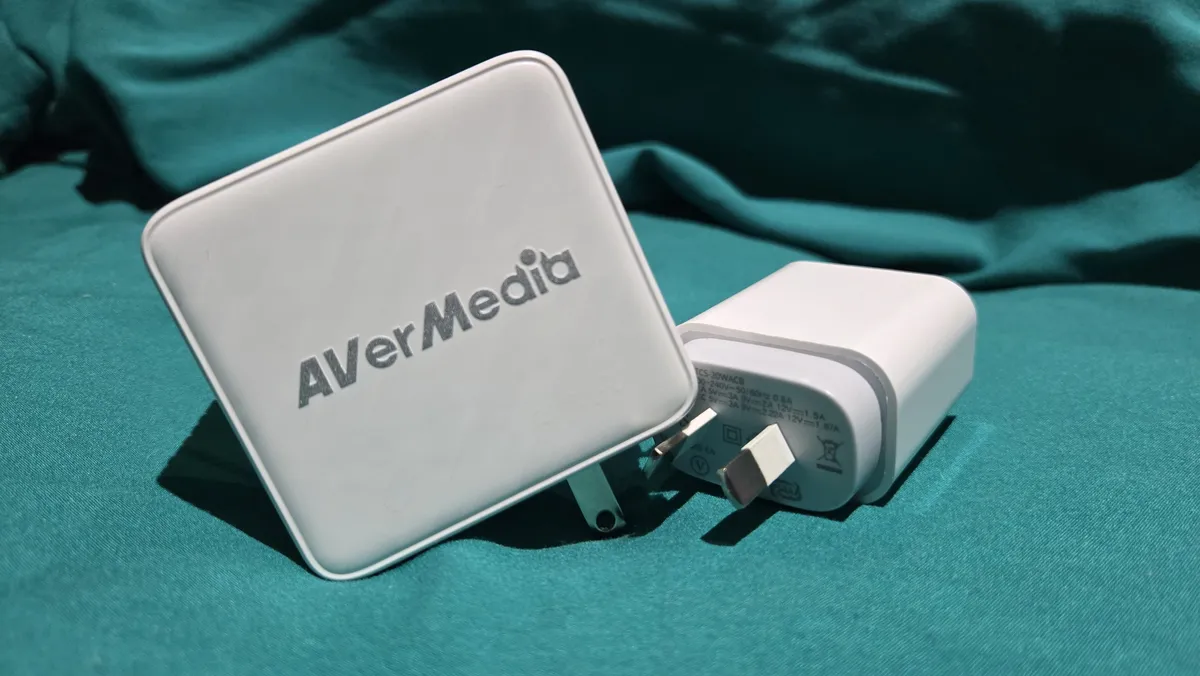
✅ You need to record footage from your Steam Deck: If you have a handheld gaming PC, this is a great way of getting footage, as it's nice and compact, and super easy to use. ❌ You want noticeably high-quality capture: Recording just 60 fps at 1080p, there are other choices on our list that record higher quality gameplay, and for a similar price. AVerMedia is one of the kings of the game recording device world, being in the market with consistent and high-quality gear for a long time. The AVerMedia Elite Go GC313Pro capture dock is the standout capture card to use for the best handheld gaming PCs thanks to its ease of use, great size, and ability to double up as a charger. A bit of an oddity in the capture card market, the Go GC313Pro is effectively a wall outlet with one USB 2.0 Type-C port, two USB 3.2 Gen 1 Type-C ports, and a HDMI port. This means you can plug it in to charge your device and hook up the HDMI to a secondary device to record gameplay. It can also function as a standard dock thanks to a 4K 30 fps passthrough. One of the biggest downsides of this capture device is the fact it can only record at a max of 1080 at 60 fps. For getting handheld clips, this is enough for a good video or stream but there are other more clunky options available that get better quality. The AVerMedia X'tra Go CG515 is a dock that can record up to 4K at 30 fps but it's almost double the price and much more cumbersome to use. Not only is the GC313Pro the best device right now for someone looking to record their gaming and handheld (or gaming console), but it's also the best choice for someone who likes to travel a lot. You can throw out extra charging bricks from your suitcase as, in a pinch, you can just use it to charge your gear without needing to record anything. The Elite Go GC313Pro's strongest points make it a rather niche device but a great one in the right kind of setup. This is all helped by a super solid price point. If you are on a budget, find yourself travelling a lot, and would like to charge your device easily while you record, AVerMedia has you covered. Read our full AVerMedia Elite Go GC313Pro review. OBS and other third-party capture and streaming software are great, but there are limitations, let's say you want to stream gameplay from a game console or use an HDMI camera instead of a webcam; the easiest way to get them to work your PC without an external or internal capture card. This is less of a concern on some modern graphics cards, as Nvidia's RTX series of GPUs use a dedicated hardware encoder called NVENC to minimise the load on your system, whereas AMD cards can use VCN, or Video Core Next. However, dedicated capture cards can still provide advantages in terms of features and support. Also, if you dual-wield a PC and console, such as the PlayStation 5 or Xbox Series X, an external capture card can help you pull footage from those devices. if (window.sliceHydrationLazy) {
} else {
console.error('%c FTE ','background: #9306F9; color: #ffffff','no lazy slice hydration function available');
}
if (window.sliceHydrationLazy) {
} else {
console.error('%c FTE ','background: #9306F9; color: #ffffff','no lazy slice hydration function available');
}
if (window.sliceHydrationLazy) {
} else {
console.error('%c FTE ','background: #9306F9; color: #ffffff','no lazy slice hydration function available');
}
if (window.sliceHydrationLazy) {
} else {
console.error('%c FTE ','background: #9306F9; color: #ffffff','no lazy slice hydration function available');
}
✅ You're looking for a charger: AVerMedia's capture device works not only as a recording hub but also as a standard charger, which means you can charge while you playAlso tested
FAQ
Why do I need a capture card if I just use OBS?
With software like OBS, you are entirely reliant on your system resources, such as your CPU or GPU, when it comes to capturing video inputs. That can drain if you capture at a high bit rate and try to play a game simultaneously. Modern CPUs have improved at the necessary multi-tasking, but a dedicated capture card can help lighten the load.